- NarrativeBear@lemmy.worldEnglish6 days
Google says “power users” can “still install” unverified apps. Here’s what that actually looks like:
Delve into System Settings, find About Phone
Tap the build number seven times to enable Developer Mode
Dismiss scare screens about coercion
Enter your PIN
Restart the device
Wait 24 hours
Come back, dismiss more scare screens
Pick “allow temporarily” (7 days) or “allow indefinitely”
Confirm, again, that you understand “the risks”
Nine steps. A mandatory 24-hour cooling-off period. For installing software on a device you own.
Worse: this flow runs entirely through Google Play Services, not the Android OS. Google can change it, tighten it, or kill it at any time, with no OS update required and no consent needed.
- 8uurg@lemmy.worldEnglish5 days
Worse - that 24 hour timer? You only have a short window of time once it finishes to continue, otherwise you have to wait another 24 hours.
- 4 days
Under the assumption this is a non negotiable thing…
They should at least let you alter the timer if you know you might not be able to
Like if in the post 24h window you know you’ll be busy, let you make it 28h instead of 24h
- pHr34kY@lemmy.worldEnglish6 days
It won’t be a problem on a de-googled phone. Get it running LineageOS or GrapheneOS. Then install F-Droid (and probably Aurora store too). Some Google junk won’t work, but you’ll soon be more limited by having Google services on your phone than not having it.
- 5 days
Hardly the point though. For us this is a bother at most, but we can cope because we’re already doing our own thing and know what we want. Imagine trying to get your non tech-savvy friends to “sideload” (install) an app from outside the Play Store. Right now it’s not a big deal, so if they’re interested in the app, they’ll likely install it. But this amount of friction and scary warnings is way more likely to stop them.
 5 days
If one looks at the supported devices pages (which I do regularly hoping that it supports mine) it’s easy to see that 99% of devices on the market simply can’t use them.
- pHr34kY@lemmy.worldEnglish5 days
Yeah, it’s been getting harder as time goes on. It’s basically only pixels that are supported and still on the shelf.
Non-tech savvy people don’t even care, don’t even think about this, and don’t know anything about it.
- 5 days
No, some of they do care, but just have problems learning tech stuff or were excluded from digital education at the critical age, or have in general learning difficulties.
My mom wants to still be able to install and uninstall anything she wants on her phone, but she’s elder (and is neurodivergent, too, as me) and has difficulties understanding and learning about tech stuff.
You’re making a hasty generalization based on just a composition fallacy (some non tech savvy people don’t care at all, yes, but those are not all of the non tech savvy people).
You shouldn’t be conflating both things as if it were the same, and even if they were the same (which they’re NOT), that wouldn’t make your comment less bad. They’re still victims of the Big Tech propaganda and marketing and of their massive social, cultural and political influence campaigns.
Please, don’t be such a dickhead.
Show me one non-tech savvy person that is installing anything that isn’t in the Android Play Store already. And that person has to have come up with this on their own and it wasn’t somebody like you who maybe tech savvy showing them how to do this I’ve been in IT for 21 years and I can guarantee no one is doing that.
- amplifiedrabbit@lemmy.todayEnglish4 days
A non tech-savvy person may not be aware of the extent of digital surveillance and the rights they give up on their data unless someone who is aware tells them about it.
Even after becoming aware - the inconvenience of switching to something else forces them to stay in that ecosystem unless someone helps them out of it. Many of them care enough to want to stop or limit their exposure to big tech, but without someone tech savvy to help they won’t know where to start.
- sem@lemmy.blahaj.zoneEnglish4 days
And that person has to have come up with this on their own
Why is this a requirement?
Plenty of people who would use privacy-respecting, free software that a tech-savvy friend likes and uses will now have to go through this process and probably decide it isn’t worth it.
i hadnt thought about it before but i just had the realization that im not even gonna be able to have 3rd party apps AND my banking app in the same phone (cuz it doesnt like developer options being enabled). uhm shit
- cotlovan@lemmy.worldEnglish5 days
I unlocked my phone’s bootloader. I’m on the oem OS, up to date, no root, just unlocked the bootloader. Now my device is “not certified” and a lot of apps that have no business caring about my “certification status” don’t work (like my phone operator app). That’s if the playstore lets me download it in the first place: “this app is not compatible with your device”
- notthebees@reddthat.comEnglish5 days
Latest Android update will hide developer options supposedly from apps. However, it’s on Android 17
- 5 days
This is why rooting is great and if you re worried about banking apps, KernelSU is very good at blocking detection and keyboxs for the hardware attestation get leaked weekly.
- grue@lemmy.worldEnglish5 days
This is why antitrust law is great… or would be, if we fucking had it anymore!
Technological workarounds are not the same thing as actual solutions.
- WhyJiffie@sh.itjust.worksEnglish4 days
https://github.com/tiann/KernelSU
To help translate KernelSU, we no longer accept translation contributions via Weblate. All translations are now handled using LLMs.
what???
- WhyJiffie@sh.itjust.worksEnglish4 days
also, what do you do with the leaked keyboxes? does kernelsu handle them too, or do you use a different tool for that?
- 4 days
I use play integrity fix and tricky store. Everytime it is revoked, I change it to an unrevoked one. KernelSu hide the root and modules.
- rotten@lemmy.todayEnglish4 days
The same procedure applies if you want to unlock the bootloader?
Edit: OK nvm it must be done to unlock the developer’s option
- polle@feddit.orgEnglish5 days
I recently learned that this setting actually persist after migrating to another phone.
that would be only if you chose to backup and restore your android settings
Which is perfect for them to keep tying your profile information across the board in yet another way. Fuck that.
- boonhet@lemmy.zipEnglish5 days
Do you create a new Google account every time you change phones? They’re already tying everything to you
I have 1 Google account use specifically for spammy shit. That account is tied to a completely fictional person and lives inside 1 chromium browser.
My phones and computers have never seen a Google account other than inside the VM that runs that browser.
Nice. There’s just a FOSS alternative for almost everything these days. I get 80% of my apps from F-Droid.
- morto@piefed.socialEnglish6 days
The only non foss apps that I use are banking apps and whatsapp (forced to use it…). Everything else is foss.
- NarrativeBear@lemmy.worldEnglish6 days
Look at Beeper as a alternative, let’s you bridge your WhatsApp chats.
- hornedfiend@sopuli.xyzEnglish6 days
The only way you should trust anything bridging is if you self host it.
Matrix with WhatsApp bridge is the only way to properly use that.
- 5 days
For many people it’s literally impossible to self host anything, whether it’s because of lack of decent hardware resources, and/or because of a lack of technical knowledge, and/or because of a lack of time, and/or because of a lack of energetic stability, and/or because of a lack of monetary resources, and/or because of a lack of mental and/or physical energy, and/or because of a lack of someone with some or any of these; and of course, all of these things can be and in fact are intersectional with each other.
So that’s why any managed alternative it’s still a good alternative for these people; obviously, only if they’re as transparent and reliable as humanly possible.
I myself only do use Disroot’s (and maybe Nadeko and a bit others) services because I don’t have the hardware, the money, the energy and the enviromental resources to be able to properly self host, and even more, I only use the free tiers of these services.
- NarrativeBear@lemmy.worldEnglish5 days
Absolutely, make sure to self host the bridge yourself on your own hardware!
I don’t take advantage of Beeper nearly as much as I should, I saw that they give you a Matrix handle when you sign up which I think is cool.
They give you a Matrix handle because everything is Matrix. The problem is Beeper is nothing to do with Beeper but exactly the kind of thing we saw with Apple: malice. They don’t want you to use their apps this way, and for that reason, it just sucks to use. Plus you’re lowering the privacy of whatever platform you’re using to that of Matrix.
- puz@piefed.socialEnglish4 days
Curious. Do they easily find you that you use it?
If meta automatically detects that you use beeper and bans you then there is no point using it with WA. But in this case beeper wouldn’t advertise bridging to WA, right?
mines been on no updates for years after they removed the ability to downgrade apps inexplicably.
+1 for neo store. I wonder if the new f-droid overhaul catches up as neo is pretty fantastic.
Edit, just looked at the screenshots, looks better than before but I’ll stick with neo.
Does Neo Store have a way to make apps only use the official F-Droid repo for updates unless you downloaded them from a different one? Because it seems to just want to update from any repo, so I ended up splitting F-Droid Basic for official F-Droid apps and Neo Store for IzzyOnDroid and other third party repos.
- 5 days
Yeah, if you manually select it in the app releases section. Of course, the thing is that it’s only per app.
Anyways, I prefer IzzyOnDroid because imho they have a better reproducible builds system.
Neo Store also allows you to review the reproducible builds’ status for every app, and also its download statistics (total and per repo).
Also you can now maintain a local blocklist of apps you don’t want or like to see. It’s pretty neat.
F-Droid has stricter requirements for apps to be listed so I prefer the official repo, for instance Aves on IzzyOnDroid has Google dependencies that Aves Libre on F-Droid doesn’t have. IzzyOnDroid is my backup for some apps I want that aren’t on F-Droid.
- 4 days
That’s fair.
Although reproducible builds are something I truly love because these make auditing so much easy.
- amlor@piefed.socialEnglish5 days
Haven’t noticed it doing that, maybe they fixed it? There was a new release a few days ago
It is a chore to re obtain everything on a new phone… If you didn’t make a backup.
I love that I’ve never heard of Droidify. Open source offers a buffet of alternatives.
- 6 days
Honestly the new ui is nice enough I may be switching back to the official F-droid app.
We’ll see where I stay. I love the simplicity of droid-ify but sometimes have some issues with minor jank
- berty@feddit.orgEnglish6 days
That was the reason I switched back to F-Droid. Had serious problems with updating and stuff, no problems with F-Droid so far. I don’t use it that much anyways, most of my apps are already installed. When searching for new apps F-Droid has a big category selection which is nice.
- 6 days
I’ve mostly been happy to just put up with the jank but if I get a nice interface without any I won’t complain :)
Plus it feels nice for the f-droid projects own app to be in a good state and I’m excited for that ☺️
- Crit@lemmy.wtfEnglish4 days
I’ve tried alternative apps but they sometimes just break or stop working with the f droid repo, so I gave up and went with f droid basic.
- sem@lemmy.blahaj.zoneEnglish4 days
I tried it but i ended back up with the official fdroid for some reason i don’t recall.
- 5 days
I just use Neo Store. The best F-Droid client ever.
Change my mind.
- 4 days
Download statistics for every app (which is neat because that can indirectly tell me how good is an app), also it shows the reproducible builds’ status for every app, allows you to directly scan an app through Exodus so you can have a detailed view of its possible trackers, also it lets you blocklist apps (althought I’d love it to let me blocklist authors too, and the UX is a bit slow for now as it requires you to go throught the settings to be able to do it), the y have a reasonably big amount of preconfigured repos and make the process of adding new repos way easier than other clients, their UI is just beautiful and now they made it hugely customizable, and they have so many QOL features that’s a breeze to use.
- morriscox@lemmy.worldEnglish3 days
Remove: Exodus report service (API access revoked)
This is in the latest version.
- morriscox@lemmy.worldEnglish3 days
https://f-droid.org/packages/com.machiav3lli.fdroid/
https://github.com/NeoApplications/Neo-Store/releases/tag/1.3.0
EDIT: I installed Neo Store for the first time, and from F-droid, and Exodus works for me.
- 2 days
Yeah, I don’t know if they only removed the ability to show the results directly inside Neo Store, but only left the ability to open an app with Exodus and see the results there.
- rotten@lemmy.todayEnglish4 days
Now it will take them another decade to update apk on their website to the newest version.
I’ve just tried it. The UX is great and the downloads are faster than ever. It’s soo much better noww!
WTF, why is the download on the Fdroid front page still giving me 1.3.2?
- kamen@lemmy.worldEnglish4 days
Could be a gradual rollout.
Edit: saw it’s actually still a beta (and probably this is why it doesn’t show), here’s a link for the APK: https://f-droid.org/repo/org.fdroid.fdroid_2000050.apk
- kamen@lemmy.worldEnglish5 days
I don’t know, could be. I just tried downloading and I’m getting the 1.x version too.
- Igris@feddit.orgEnglish4 days
Yeah me too.
Edit: just like WhyJiffie@sh.itjust.works said you’ll find it by searching f-droid on f-droid.org, scroll down to version 2.0 and download the apk.
- kamen@lemmy.worldEnglish4 days
Ah, right. It’s still tagged as beta, maybe that’s why it doesn’t appear in other places (like in the news article on their site).
Thanks for the tip.
I use droid-ify. It didn’t pop any updates for F-droid, but I updated it manually, since the 2.0 version is there.
- Hadriscus@jlai.luEnglish5 days
I downloaded the apk directly from the website and it still installs 1.3.2 or whatnot, what am I doing wrong ?
- WhyJiffie@sh.itjust.worksEnglish5 days
open the app’s page and expand versions. the last one was just not marked recommended yet, in case there are serious bugs
- Hadriscus@jlai.luEnglish5 days
Found it !
https://f-droid.org/packages/org.fdroid.fdroid/
I had to go through the Gitlab, browse to “client” (https://gitlab.com/fdroid/fdroidclient ), and scroll down to the readme section to find the link.
- WhyJiffie@sh.itjust.worksEnglish4 days
I think you can get to it also by searching “f-droid” inside f-droid
UX is much better. I wouldn’t say it’s great. At all.
But I’m really happy to see big improvements! And I’m finding things I had no idea were on the “store” before at all. Which ultimately is the goal.
- 6 days
Can anyone ELI5 for the nontechy how things are going to work once Google rolls out the new bullshit? I’m seeing so many of my apps put out notices that they will no longer work once Google goes through with the verification system. Will I still be able to install shit through f droid?
Will I still be able to install shit through f droid?
yeah, with extra hoops the first time though (24 hr wait etc etc)
- 6 days
I already have developer options turned on, are they gonna fuck me out of that again? :/
I really hate this shit
- MonkderVierte@lemmy.zipEnglish6 days
I really hate this shit
If you have Play Services running, Google owns your phone (and also tracks you, and sucks 50% of the juice for it). Just rip 'em out.
- 5 days
I genuinely don’t know that I’m techy enough to do that. I depend on banking apps and such and I don’t understand how to get around that. I would, if I could be taught lol
Look at Universal Andriod Debloater. Makes it very easy to remove whatever you want.
Your banking apps may not work if you remove Google Play services but i’ve found i can just log in through the browser instead.
Not as convenient but it feels good knowing Google can’t have any of your data.
Let me know if you have any questions about UAD!
I believe you need a custom ROM to run microG. Something like GrapheneOS, LineageOS, PostmarketOS, etc. Unfortunately my phone is too new and isn’t supported by any of them so haven’t been able to test it. Yet!
Can you restore them if it breaks things too much? My bank requires 2FA through an app for any money transfers, and I assume it needs them but I’m not sure.
Yeah the debloater has an option to restore what you remove! I’d make take some pictures of the exact names of things just to be safe.
- NarrativeBear@lemmy.worldEnglish6 days
Ya there’s going to be wait periods to turn on developer options, and it sucks cause some apps don’t work with developer options turned on, like banking apps for example.
This whole thing sucks, imagine on your laptop not being able to install software and only being locked to getting everything through the Microsoft Store App.
- reksas@sopuli.xyzEnglish5 days
the problem here isnt that users cant do what they want, its that developers might stop developing because not enough people cant be arsed to jump through googles hoops. Everyone who can should support opensource developers more than ever now.
Been using it since the alpha came out, absolutely love what they’ve done with the app. The installation flow is much smoother with the instant prompt for confirmation, the more granular categories and improved search make browsing so much better. I tried other stores before, but I couldn’t get myself to like any of the actively maintained ones, v2.0 is good for me.
- 4 days
Wow. I was not expecting that big of a UI change upon updating F-Droid. It looks modern, I like it a lot!
- OccasionallyFeralya@lemmy.mlEnglish5 days
The new ui is excellent, much more approachable in my opinion
- Quacksalber@sh.itjust.worksEnglish6 days
When you find an app, F-Droid 2.0 will make the installation process easier. Google has long put up roadblocks for sideloaded apps, citing the security implications. This is also the rationale behind its upcoming developer verification system. For now at least, apps will be easier to install from F-Droid thanks to the use of Google’s pre-approval API.
That answers my question if those smoother installs already account for Google’s insistence in making “sideloading” way more annoying. They do not.
I’ve been on neo store for a couple of years for the apps that have no APIs ready in git repos (for those, Obtainium is just the greatest). I tried the new F-Droid app, and it is way smoother than the last time I tried it, and the UI improvement is amazing. They still show you apps that haven’t been maintained for over a year up front, but that’s not a deal killer.
- sem@lemmy.blahaj.zoneEnglish4 days
Posted on Sep 24, 2026 by
 F-Droid
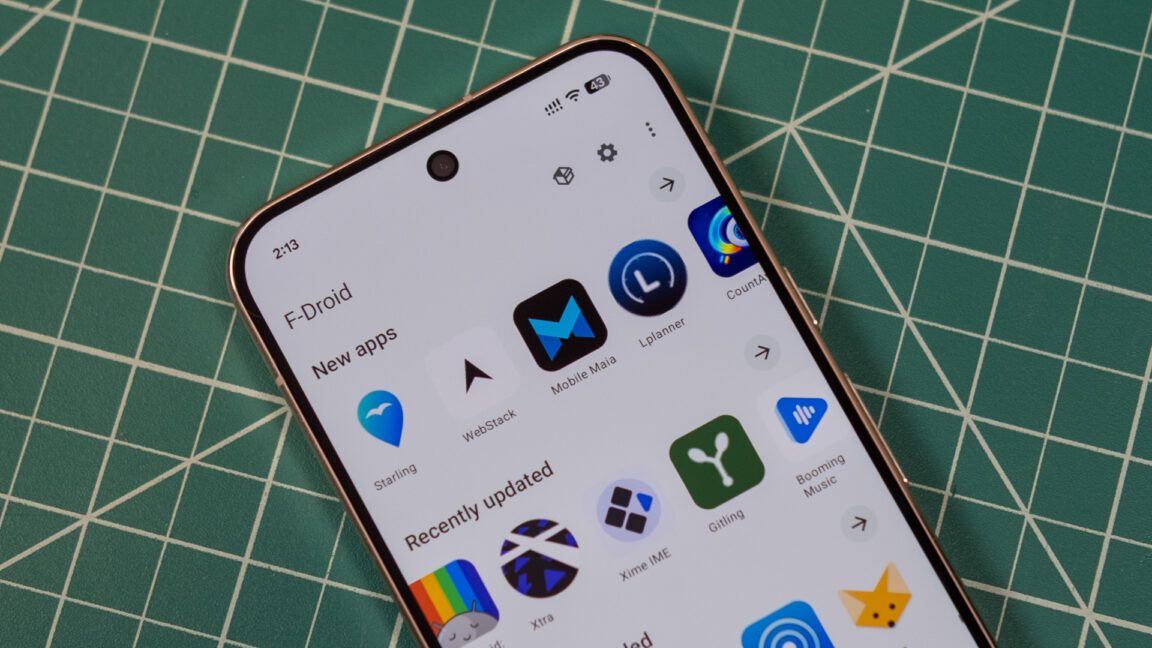
After more than a year of hard work, we are thrilled to announce the launch of F-Droid 2.0, a complete redesign of the official F-Droid app and the largest app update in 10 years.
For more than a decade, F-Droid has helped people discover and install free and open source Android apps. F-Droid 2.0 builds on that foundation with a modern interface, better app discovery, improved search, and a simpler experience that works well, whether you’re new to F-Droid or have been using it for years.
This isn’t just a visual refresh. The user experience was redesigned to integrate smoothly with current Android patterns, like Material Design, while keeping familiar F-Droid interactions in place. Key components were reworked and rewritten using Kotlin Compose, the standard toolkit these days, creating a foundation that will help us deliver improvements more quickly in the years ahead.
We are excited to begin rolling out F-Droid 2.0 to users over the coming weeks after 14 test releases.
What has changed?
One of our main goals for F-Droid 2.0 was to make it easier to discover, install, and maintain the apps you rely on. We simplified the main navigation into three core areas: Discover, Search and My Apps. Categories are now integrated into Discover, making it easier to browse and explore, while My Apps provides a central place to manage installed apps, updates, and potential issues. Settings and Nearby Swap are still only a tap away from the top bar, but no longer compete for space in the main navigation.

[… Continues at https://f-droid.org/en/2026/09/24/f-droid-2.0-a-new-chapter-for-android-freedom.html]