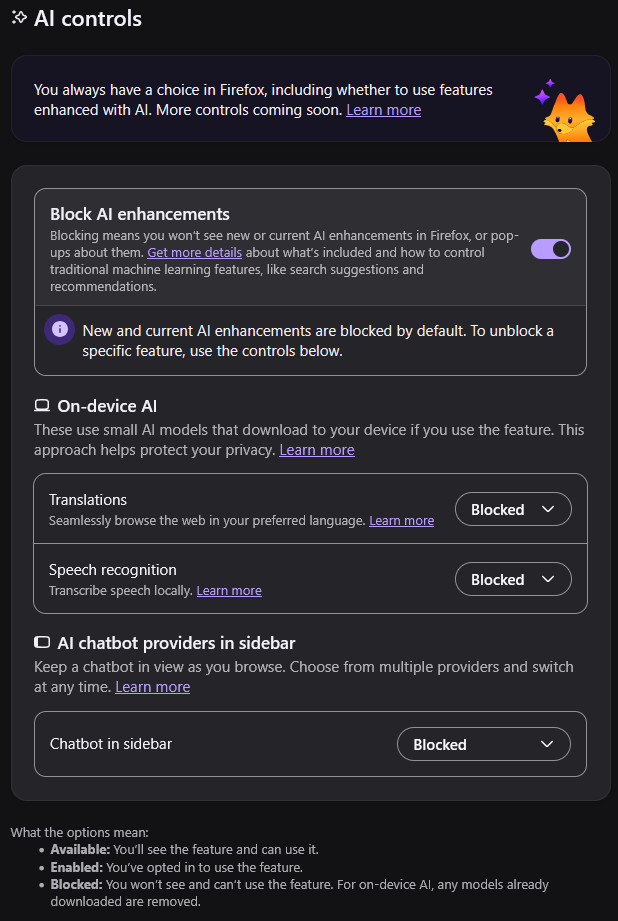
I’m sorry, I’m not often someone to whine about Firefox UI. Usually their changes have been for good actually. BUT! But but but. Proper UI design would require AI features to be disabled if the toggle is disabled. This is both highly silly and very confusing.
You must log in or register to comment.
- glibg10b@lemmy.zipEnglish2 hours
This is just my opinion, but I think it’s reasonable to require your user to go to the settings if they want to remove a context menu item.

In fact, I think they’re going above and beyond here. Most people never use “Inspect Accessibility Properties”, yet they added it here with no option to remove it, and yet no one’s complaining.
I think the cause of this outrage is people reading too much into Firefox’s AI features. Firefox doesn’t bundle an LLM or make requests without your permission. It doesn’t put AI overviews on your pages. It didn’t remove existing functionality to make room for the new buttons. And it doesn’t shove any of the features into your face. It’s just a context menu item that opens a website in the sidebar if you choose to click on it.
 45 minutes
Also, why does it say “blocked” instead of “disabled”? This kinda leads me to imply that their AI features are spyware
- remon@ani.socialEnglish40 minutes
When they first announced this they called it the “AI kill switch”, so they already toned it down.
- 6 hours
If you refer to a traffic light as a “stop” light then you can interpret red as “do not stop”.
- ggtdbz@lemmy.dbzer0.comEnglish9 hours
On device translation is amazing and exactly what this software should be approved for, I think it’s good that they let you pick this separately. I don’t care for surrendering my cognitive functions to an advertising panopticon machine, but translating pages without letting Google know what sites I’m looking at? Yes please
- SaharaMaleikuhm@feddit.orgEnglish8 hours
Agreed. It’s the only one I leave turned on and use rarely. I do appreciate that it runs locally.
- h0pfries@lemmy.todayEnglish12 hours
I don’t see the problem. The paragraph of text explains exactly what it’s doing. Do you also have a problem with the “enabling” of your ad blocker “disabling” the ads? There’s nothing “dark pattern” about this at all.
- TheFogan@programming.devEnglish12 hours
I could see that, but I think the key difference.
Adblocker is an active block of something from outside.
AI block is telling firefox not to use any of it’s own.
Kind of a do this, versus don’t.
“Do protect me from attackers.”
“Don’t attack me”
- hendrik@palaver.p3x.deEnglish5 hours
Hehe. 47 people here think “enabling the disable-ation of ads” is clear language?! I’d like browsers / distributions include uBlock per default so there’s less spying. And if you want to enable all the ads and trackers, you’d go to the top right and press uBlock’s power button (to turn uBlock off - and ads on). I think that’s a clear and straightforward UX. At least that’s how I set up Linux computers and nobody ever complained 😄.
I mean it surely is a dark pattern to trick people into giving away their personal data to all those companies? Most of the users aren’t even aware. And their consent is fabricated by making this backwards?!
- 8 hours
What exactly is this disabling? Firefox’s built-in AI tools? Or is it disabling AI tools on websites you visit? Because “blocking” seems like a very misleading term to be using if it’s an internal presence being turned off. We typically only “block” remote things we know to be harmful to our experience, like harassing users on internet platforms or websites known to contain malware.
This is honestly some selfawarewolves shit at this point, Mozilla.
- njordomir@lemmy.worldEnglish6 hours
Some dynamic text under the toggle that reads “AI Anti-Feature ‘X’ is on/off” could ensure absolute double-certain clarity.
- Khanzarate@lemmy.worldEnglish3 hours
There is in fact a “what these options mean” at the bottom of the page that does that.
- 9 hours
As someone who has gone through Windows group policy, the amount of weird policies and regedits we have to do to disable AI, recall, anayltics, etc. it’s insane and the process flip flops with tricky wording. Enabling something here and disabling stuff somewhere else, it gets annoying
Yes but I would argue that its function is properly described. I mean, it says what it does and if you want you can enable what it actually says.
- Doodle69420@lemmy.worldEnglish9 hours
Pushing the opt out responsibility on the user is why I left Windows and never looked back. I recommend Waterfox which I started using a couple months back when Firefox started going in this direction. Waterfox is great on desktop and Android (which I’ll hopefully shed soon too when my current phone stops working).
- bertlewirth@lemmy.worldEnglish9 hours
I moved to librewolf a few days ago. Got sick of Mozilla fucking with shit. Yes, I’m aware librewolf is Firefox underneath.
- Flaqueman@sh.itjust.worksEnglish11 hours
I agree. This is a double negative. Language usually goes with positive statements instead of double negative. You don’t say “I didn’t fail”. You say “I succeeded”. With that logic, the UI should say “Enable AI features” instead of “Disable AI blocker”.
- GalacticRobot@lemmy.worldEnglish2 hours
You do the same thing with ad blockers. They are on when you are blocking ads. This is on for blocking AI.
- Flaqueman@sh.itjust.worksEnglish1 hour
Ask yourself what’s the main purpose. For an ad blocker, the purpose is to block ads. The dev spent hours developing the blocking mechanism, so it’s normal that it’s called an ad-BLOCKER. For the Firefox AI features, they spent hours implementing the AI tools. Look at the pop-up blocker in Firefox. It says “block pop-ups” because that’s the feature the dev worked on.
- 10 hours
It really depends on the context. e.g. if you just barely pass an exam, that’s not really a success - but you truly didn’t fail, which was probably your objective instead of being successful (i.e. getting a good score/grade) on the exam.
- 9 hours
So, was it blocked by default?
If yes, I wouldn’t read too much into it.