- 4 days
There’s nothing wrong with tuning your UI to match one you’re more comfortable with. Thats the beauty of Linux.
- 4 days
I wish I could tweak Win 11 to look like Win 7. The only improvement since then was putting the Folder Up button back and adding tabs to Explorer, everything else is worse.
- 0ops@piefed.zipEnglish4 days
Exact same. That missing up button alone made me not like Windows 7, I didn’t realize how much I relied on it in xp. I have one pc that I keep Windows 11 on for work because there’s just too much niche software I need that only supports Windows, but everything else is Linux at this point.
I used to do this, and it meant I’d hold onto old habits and never used my current OS how it was intended.
This wasnt just for Linux either, I’d try using Win95 like 3.1, I’d try using XP like 98, I’d try using win 8 like 7, I’d try using OS X like Windows and I’d try using Linux like OS X or like Windows.
When I decided to learn the OS I was using (which didn’t take much effort, but was a bit of a conscious decision) I had a much better time, less frustrated and more comfortable.
That would always be my recommendation to anyone switching OS (Or DE) learn it the way it was intended and you’ll have a much better time
- 3 days
The way my OS was intended was to be windowslike.
It uses kwin
- 4 days
Being comfortable with something is overrated, try new things and see what clicks for you. I never understood the “it’s what I’m used to” thing, that just drives me crazy because you are so aware of the issues and there’s never any excitement and interest of discovery. And I don’t mean that you need to change everything all the time, I very much have specific things that I go to great lengths to have but I have those because I’ve found them and nothing else has come close to feeling as good.
- 4 days
Trying new stuff is great - when you choose it. Random surprise tweaks that you’re forced to spend a while figuring out how to revert are pure fucking evil and everyone knows it.
What’s especially terrible is when people change stuff for the worse, then remove the old better option.
- 2 days
Linux Mint was designed to deliver a smooth landing from Windows, and if you’re the type of guy to have a problem with it, then the entire FOSS communtiy is gonna have a problem with you, because you’re making it harder for people to escape from corporate solutions.
- 4 days
What’s wrong with wanting a UI you’re used to?
Everyone wants other people to switch to Linux until they do literally anything a purist wouldn’t do with their own personal setup 😅
 3 days
My grandmother never realized she was using Linux because it just looked like all the other computers. (Linux was not the cause of her death)
great comment!
(Linux was not the cause of explodicle’s grandmother’s death)
There is a heckuva lot to be said for the classic “start” category based app menu, tied to a task bar. XFCE, MATE, OpenBox, all draw from a paradigm established in the Windows 95 design.
- 2 days
Its not a bad design. Personally, I couldn’t get used to anything else (and I’ve tried). My first PC had Win 95 and I’m now on a Plasma desktop.
Microsoft is doing a great job at completely crippling the fuck out of their start menu though, proving once again they have no idea what direction they’re going in.
- 3 days
Yeah gatekeeping is exactly how we get people to try Linux…
Ooh wait, that’s the opposite.
Let people use Linux however they want. That’s the whole point of the OS family, it’s incredibly customisable
- 4 days
Lol, I grew up with the 98se theme and xp theme, and at this point i just think they’re both incredibly ugly. Peak windows desktop prettiness and usability was windows 7 for me.
- 4 days
I disabled the UI stuff where it would look like Windows 2000 from XP until it stopped letting me. Different strokes, I guess.
- 3 days
Put this thing in a VM and then let a scammer remote into it, see what he does.
- Laurel Raven@lemmy.zipEnglish3 days
Honestly, I think Windows 8 Beta’s theme was the best looking (if you ignore the issues with the start screen): pairing Aero with the squared windows actually looked really good.
That they not only removed Aero in the final version but also soccer their lawyers on anyone who tried to bring it back was just incredibly shitty on their part
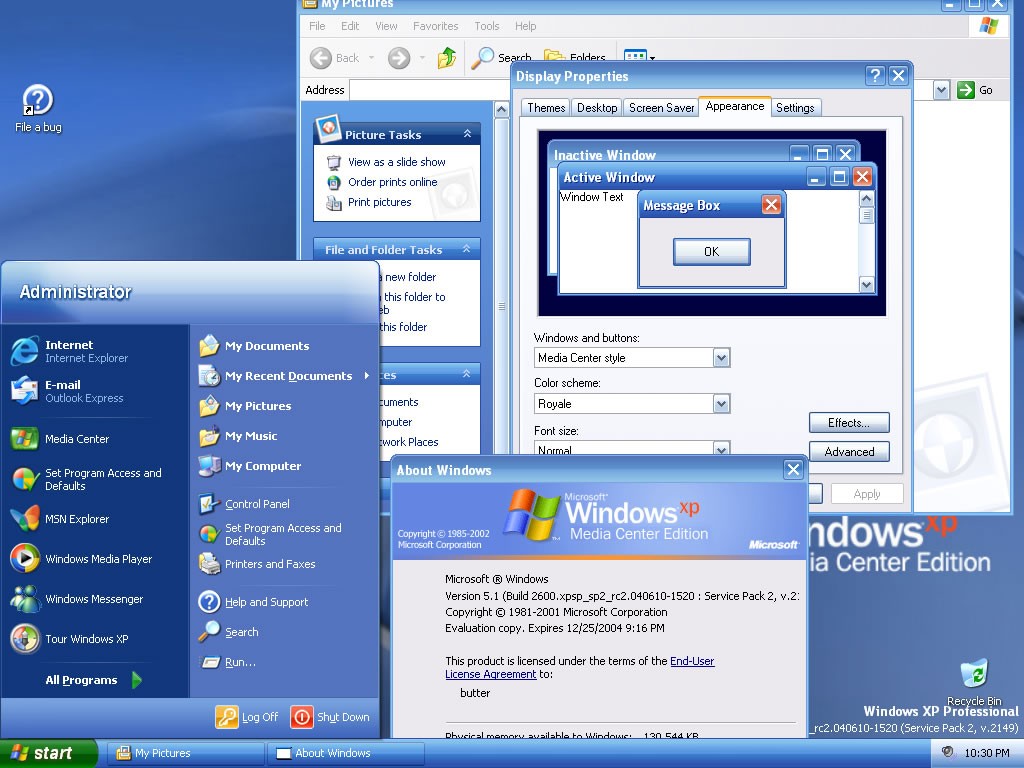
The Media Center theme was a nice twist on the default XP theme I’ll admit.
- Stock53809@lemmy.todayEnglish4 days
I used Royale Blue for ages, it was super easy to find the installer for and was signed by M$ so needed no UXTheme patch.
There was also Royale Noir and Royale Zune. Noir is a dark theme (Not to be confused with dark mode) and Zune, which was a different shade of black and sported an orange start button. Lastly there was also Royale Embedded which was a darker shade of blue, and had a blue Start button.
- Laurel Raven@lemmy.zipEnglish3 days
You mean the Fisher Price theme? While it wasn’t as bad as people seemed to think at the time, it really was kinda ugly and childish looking (but still an improvement over the corpo-boring '95 era theme)
- 4 days
Honestly, 8 and 8.1 weren’t bad visually (technically a whole different matter). I wouldn’t mind making my WM resemble good old Windows 8, but actually has a sane technical base of Linux underneath it.
- 4 days
It was the one with the weird start menu wasn’t it? Also wasn’t it the one that they started adding the second duplicate ui in a half assed way?
Like where they ended up with 2 control panels
- 4 days
Yeah, Microsoft removed the Start Menu and added full screen tiles, that were widgets that updated with stuff (like news). I don’t remember when the two 2 control panels things happened, Windows had always been a mess to me up to that point. It could’ve been sooner or later, because Windows was built with legacy support in mind.
- 4 days
I tweak my linux so it becomes a prison for anyone that boots that isn’t me, we are not the same.
- Dagnet@lemmy.worldEnglish4 days
Reminds me of this youtuber that fell for a scammer’s bait intentionally except he was in a VM of hannah montana linux. The scammer was so fucking confused haha
I don’t have a link either, but i’d check Kitboga’s channel, he is usually screwing around with scammers in insane ways
- uderecife@piefed.worldEnglish4 days
That’s why I log in through tty. What comes next is anyone’s guess. Nerd wizardry.
If someone that isn’t me can competently use my computer I consider it a personal failing. Always open to tips
I frequently compare my XFCE setup to Windows 95. The job of an OS is to run programs.
I tweaked my KDE desktop to look like XFCE.
What does that make me?- 4 days
I use Windows from Scratch. I built all the bloatware and telemtry myself, god damn it!
- 4 days
Well, first I tweak my windows to mimic the appearance of the windows that I liked, windows 7. Then I tweak my Linux to mimic that.
Just because hurr durr windows bad, doesn’t mean their huge team of UI and UX designers didn’t ever come up with a good design. And like most things Microsoft, I take pleasure in pirating it when I can.
- 4 days
IMO, Windows’s UI/UX might seem good only if you haven’t tried anything actually different. Tiling/scrolling WMs is the way.
- 3 days
I don’t really like the feel of a full tiling windows manager, I’ve tried it and I just can’t vibe with it. I use fancyzones on windows and fancytiles on mint, because I like to be able to define my zones of arbitrary size and position, like 3/8ths of a vertical screen, and snap a window to it, but then also sometimes adjust the window border a bit with the mouse. Or just stack window on top of each other. I use mouse a lot on both my work windows PC and my home Linux PC, so I customise both of them to be very similar and have the exact workflow I want, which is hyper specific. I even have the same 3-monitor layout, and keyboard and mouse on both my work PC and home pc so my muscle memory between work and home doesn’t suffer 😅
- 2 days
Makes sense. Except I can’t really say my muscle memory suffers either. The workflow on my home pc is just so different that it actually occupies a completely separate section of my memory, rather than overwriting it.
Btw, since you mentioned you’re heavily relying on mouse in your workflow, i suggest you to take a look at Kando. It’s cross-platform, and looks super cool.
I’m pretty much always picking XFCE or KDE over just a WM. In the case of KDE, I use it like Windows. I make XFCE as Unity-like as possible, which I believe is the best interface for limited screen real estate.
- 3 days
I’m using the term “WM” loosely, as a more of a general term here.
And no, i can’t call a DE that adds a title bar to every window, has a huge-ass taskbar, and a limited amount of free space per workspace “best for limited screen real estate”. Something like Niri, MangoWC or Hyprland (with scrolling layout enabled) works much better and cleaner precisely in that regard, since they offer
a) a hotkey-first UX, meaning that everything usually represented by a UI button is moved to the keyboard and no longer needs to clutter the screen
b) literally infinite horizontal space.
I literally can’t go back ever since i gave tiling a try, any floating de/wm now feels clunky and awkward to me.
I use KDE on my desktop because I don’t care about maximizing screen real estate in that context. I have a large monitor, so I can afford to lose some pixels to my taskbar or window borders. That being said, if I did care, I can make the taskbar autohide and pick a slim/minimal theme for the window borders. With regard to XFCE, I said I make it Unity-like. As such, there is no taskbar. I have a slim panel at the top that shows stuff I want to be able to see easily (i.e., pinned background applications, battery life, date, time, etc.) My dock-like panel autohides, so it takes up no real estate. Maximized windows merge into the top panel like in Unity, so the window borders take up no extra room.
Any DE can become “hotkey-first.” For example, I launch terminal with CTRL+ALT+T. My application launcher is CTRL+SPACE, and it is text-based. Most DEs have default hotkeys for a lot of functions, and they are customizable.
Of course, all of this comes down to how one’s workflow is. I don’t ever see myself wanting to scroll my desktop or deal with windows auto-tiling. Multiple desktops is another example. It’s something just about every DE offers, but I’ve never had a use for it. Different strokes for different folks.
- 3 days
I use KDE on my desktop because I don’t care about maximizing screen real estate in that context.
my whole screen real estate banter was in response to
I make XFCE as Unity-like as possible, which I believe is the best interface for limited screen real estate.
Any DE can become “hotkey-first.”
Yeah… no. Maybe i’m just too picky about my preferences, but
ctrl+alt+t,alt+f4, and other “wonderful” hotkeys that require either a huge hand stretch, or two hands to press them, don’t sound like “keyboard-first” to me. Neither does setting up said hotkeys either with a gui utility, not really meant to be used with both hands on the keyboard, or editing an ugly auto-generated json or xml config.Of course, all of this comes down to how one’s workflow is.
Of course, it’s nothing more than a matter of personal preference. I’m not trying to sell you anything, or prove your stance wrong. I just like talking about this stuff. Tell me if i’m being annoying.
I don’t ever see myself wanting to scroll my desktop or deal with windows auto-tiling.
The whole point of tiling/scrolling wms is that you have to deal with less things tho? The ideal goal, philosopher’s stone of those wms, if you may, is to make so that user, after the initial configuration, doesn’t need to concern themself with window positioning and resizing.
Multiple desktops is another example. It’s something just about every DE offers, but I’ve never had a use for it.

That’s because those DEs make it so that using them actually takes effort, because guess what, the default key bindings for them are horrible! On top of that, i’m not sure, but i don’t remember neither XFCE nor Plasma offering any sort of automation around it, (might be wrong tho) whereas in tiling/scrolling world custom rules for automatically assigning certain windows to certain workspaces, or, for instance, opening an app if you switch to a certain empty workspace, is considered a bare minimum. It naturally makes the process of navigating the windows even less chaotic. Basically, it creates a mental model, where you don’t have chaotically
alt-tabaround or seek anything with your eyes, since you just know where everything is. Your desktop becomes the perfect silent well-oiled machine that gets in your way as little as humanly (machinely?) possible, and it just feels soooo incredibly fucking nice.
- 2 days
I mean… I used to have a macbook with Linux inside customized to look like Windows 🥸😈
- 3 days